Desktop and web
Portfolio of Active Projects
Desktop and web tools from the studio. Start with SageSearch — then ask if you need something custom.

SageSearch Pro
Find anything, anywhere, instantly. SageSearch Pro is a Windows desktop search tool for large document collections. Index PDFs, Word, Excel, PowerPoint (including .doc, .xls, and .ppt), text files, translation files (SDLXLIFF, XLIFF, TMX), and Trados translation memories (.sdltm) — then preview highlighted matches and search source and target text from one window.
Built for researchers, translators, analysts, and support teams who are tired of opening hundreds of files by hand. Choose which file groups to include, set how much context each snippet shows, and run the same search from the command line. Free intro — download the app, then email us for a license key.
What it searches
- Office: Word (.doc, .docx), Excel (.xls, .xlsx), PowerPoint (.ppt, .pptx)
- PDFs and plain text (TXT, Markdown, CSV, logs)
- Translation files: SDLXLIFF, XLIFF, TMX
- Trados translation memories (.sdltm) — no TMX export step
- .xls is read natively; binary .doc and .ppt use Microsoft Office when installed

How you work
- Unicode search for English, Japanese, Chinese, and more
- Exact match, quoted phrases, and case-sensitive mode
- Word files split into paragraphs, comments, and table rows
- Translation units labeled and searchable in source and target
- Folder-aware results; PowerPoint hits labeled by slide
- Highlight Settings: font, color, style, and snippet length (80–800 characters)
- Export to TXT, Markdown, or HTML — or run the same search from the command line
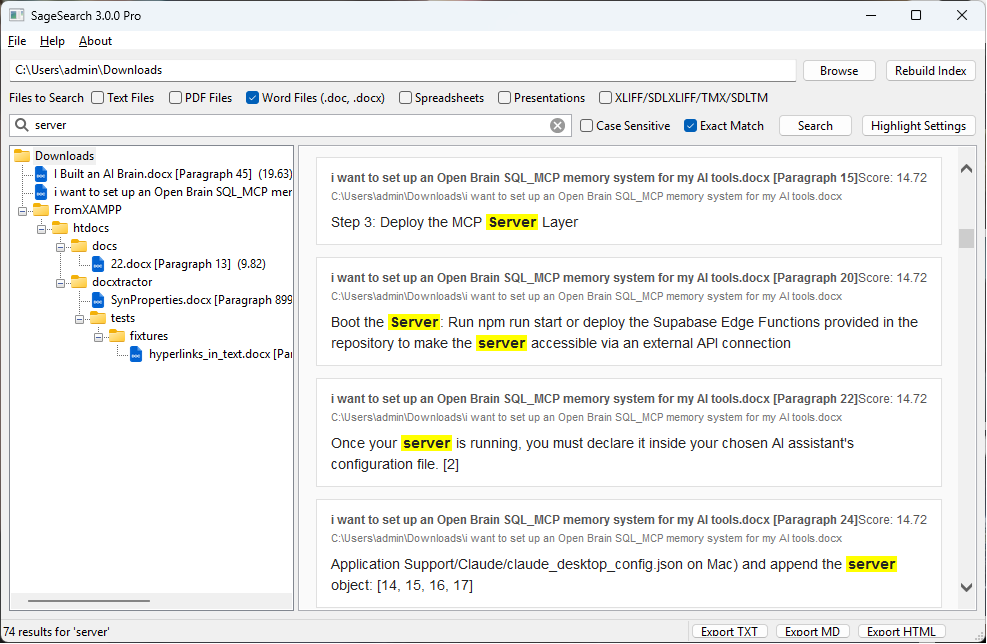
Use Highlight Settings next to the search bar to change preview font, size, highlight color and style, and snippet length (80–800 characters, default 160). Preferences are saved and reused for HTML exports. Changing snippet length re-runs the current search so the preview updates immediately. From the command line, pass --snippet-chars to override the saved length for that run.
Download and activate
- Download the SageSearch Pro zip (Windows). Unzip the folder — you need
SageSearch_Pro.exeand the_internalfolder together. - Run
SageSearch_Pro.exe. - When asked, enter your license key. The app validates it with AppHaven and activates this computer.
Need a key? Write to projects@apphaven.net and we will send a free intro key. We use that address to send the key and occasional SageSearch notes. See our Privacy page.
Windows 10 or later. Standalone zip — no installer. About 41 MB download (~100 MB unzipped).
Also from AppHaven
YT Video Downloader + Transcriber — download, clip, and transcribe YouTube videos with yt-dlp, ffmpeg, and Faster-Whisper. Documented and available as a separate tool.
Loop Finder — upload a track, detect seamless loops, preview them on a waveform, and export MP3 clips in the browser.
TimeKeeper — a local-only Windows tray app that records the active window and turns the day into an HTML report you can label by task.
SageSearch notes
Roadmap, notes, and how the indexer works.
-
Building a Better Sage Search: 2026 Roadmap for AI-Powered Discovery
A comprehensive guide to modernizing your search application with AI, covering relevance tuning, performance optimization, and production deployment best practices.
-
Overview of SageSearch’s Indexer
SageSearch version 3.0 uses an inverted index (term → document mapping) for fast lookups.
-
Benefits of Using SageSearch Pro
SageSearch Pro is a powerful full-text search tool that lets you quickly locate text within PDFs, Word documents, Excel spreadsheets,…
Need something custom?
Integrations, license checks, and other desktop or API tools are built to order. Write to projects@apphaven.net.