
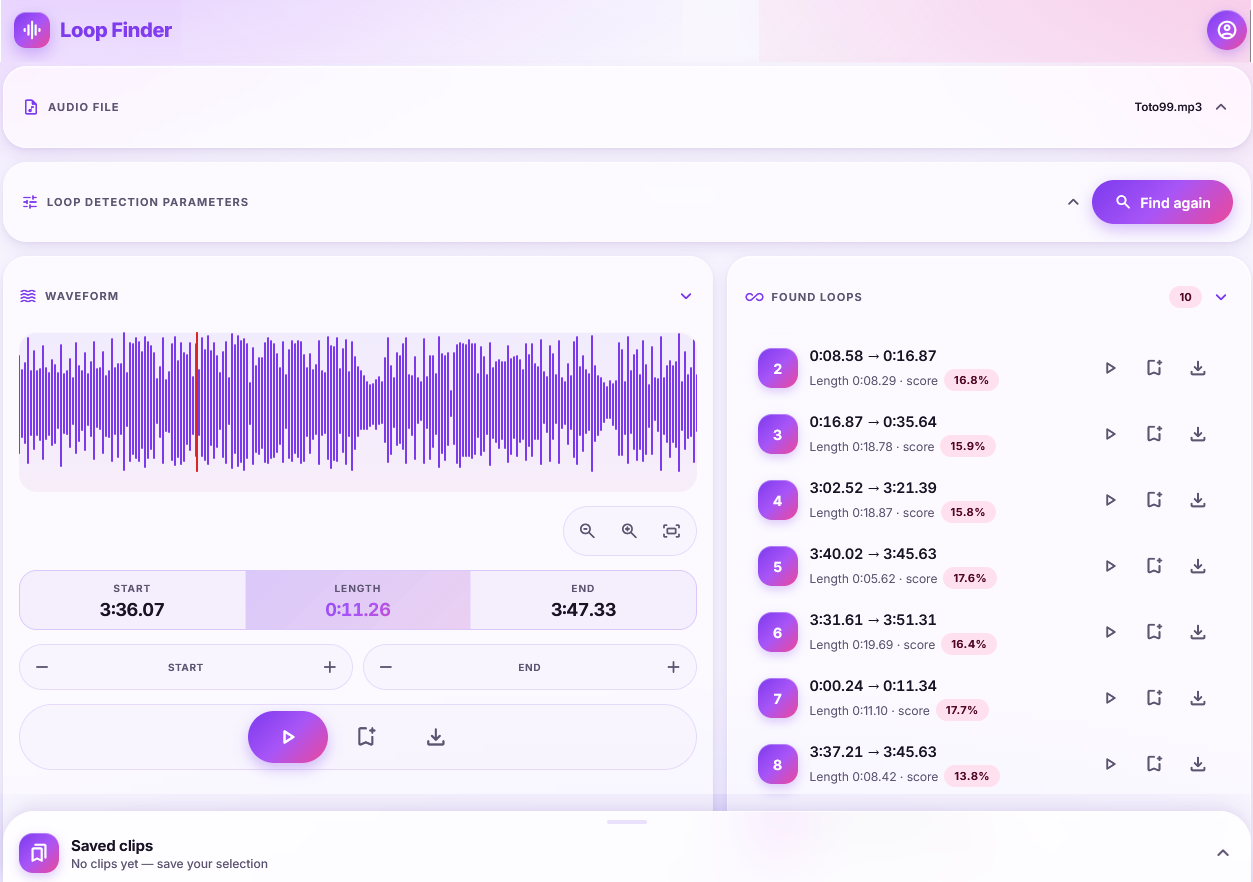

Finding a loop by ear is slow. You scrub, you guess, you miss the downbeat by a few milliseconds, and the seam clicks. Loop Finder is built for that one job: find the places in a track that can repeat cleanly, let you hear them, then export the clip.
The workflow is simple once the app is open. Upload a file. Set how short or long a loop may be. Tap Find loops. Then preview candidates on a waveform, nudge the start and end, save the keepers, and download MP3s.
Why we built it
Producers, game-audio people, and short-form video editors all need the same thing: a section that can play forever without an obvious join. Most editors make you hunt those points by hand. We wrapped a serious loop detector in a browser UI so you can do the hunt on a laptop or a phone and leave with a file, not a screenshot of a timeline.
1. Detection you can steer
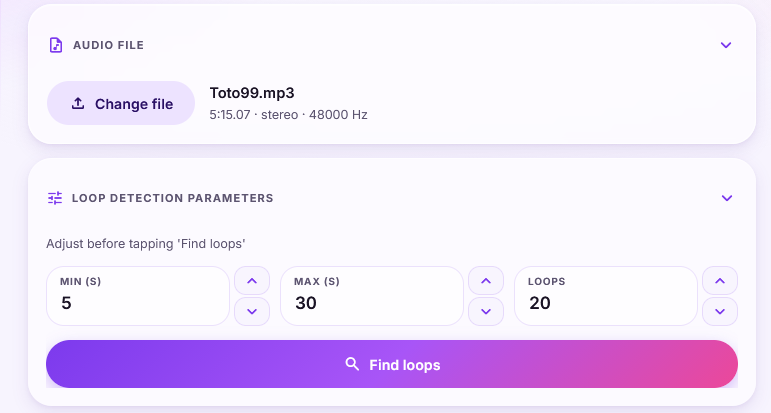
After you pick an audio file, you set three controls before the search runs:
- Min (s): Minimum duration — ignore loops shorter than this (default 5 seconds)
- Max (s): Maximum duration — ignore loops longer than this (default is in the 30–45 second range)
- Loops: Loop count — how many candidates to return (default 20)
Those knobs matter. A 4-bar hook and a 30-second ambient bed are different searches. You can save your usual defaults in account preferences, and optionally remember the last values you used on the main screen.
The backend runs PyMusicLooper and returns start time, end time, and a score for each candidate. You are not staring at raw timestamps in a terminal.
2. Hear it on the waveform before you commit
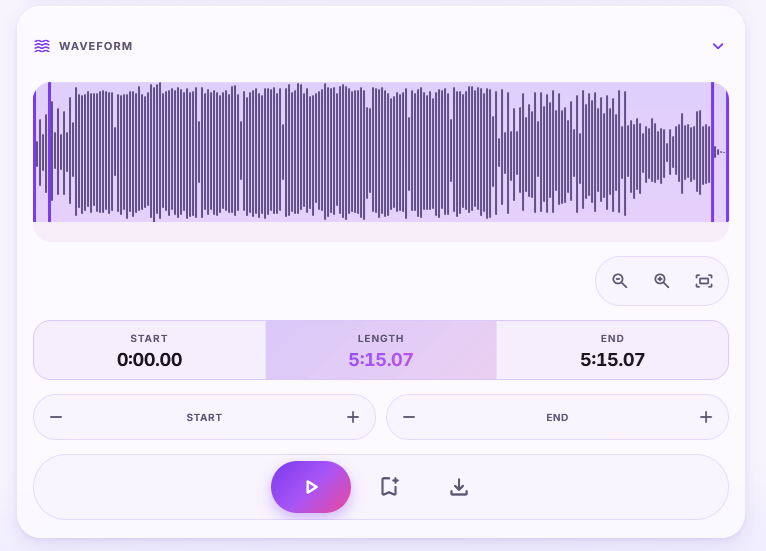
Detection is only half the product. Each candidate can be previewed on an interactive waveform. You see start, length, and end. You can zoom, fit the wave, play the loop, stop it, and nudge start or end by hundredths of a second.
That last part is the difference between “almost” and “usable.” A mathematically good loop still needs a pair of ears. The UI is there so you can tighten the seam without dropping into a DAW.
The mobile layout uses a Material-style interface and WaveSurfer. The desktop layout uses a Plotly waveform. Same job, two surfaces.
3. Save clips, rename them, export MP3s
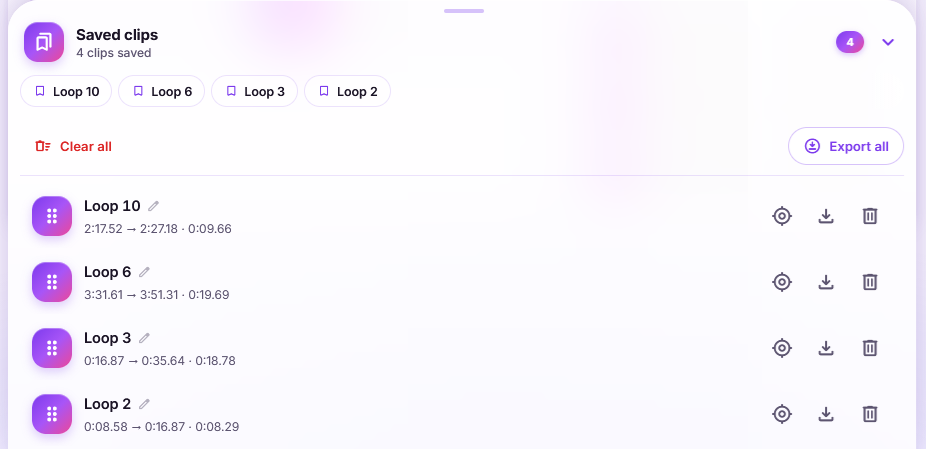
When a loop is right, you can bookmark it or download it immediately as MP3. Encoding happens in the browser. Saved clips sit in a dock at the bottom of the mobile UI: rename them, reorder them, jump back to one from a chip row, or export the whole set.
Clips are stored locally in the browser, keyed to the file you uploaded. Clearing them is explicit. You are not silently filling a server library with every experiment.
4. A browser tool, opening when the demo is ready
Loop Finder is a hosted AppHaven service you open in a browser — no desktop installer. Public sign-up, trials, and subscriptions are not open yet. We are preparing a demo video now. If you want to be notified when it goes live, or you need a studio preview, write to projects@apphaven.net.
That is the SaaS half of the studio: a tool you open in a browser, not another installer.
Who it is for
- Music producers hunting intros, drops, and one-bars that will actually loop
- Game and app audio people who need beds and stingers that can repeat
- Video and social editors who want a seamless music bed without a DAW session
- Anyone who has ever dragged loop points by a few milliseconds and still heard the click
Questions or studio licenses: projects@apphaven.net.

Leave a Reply