
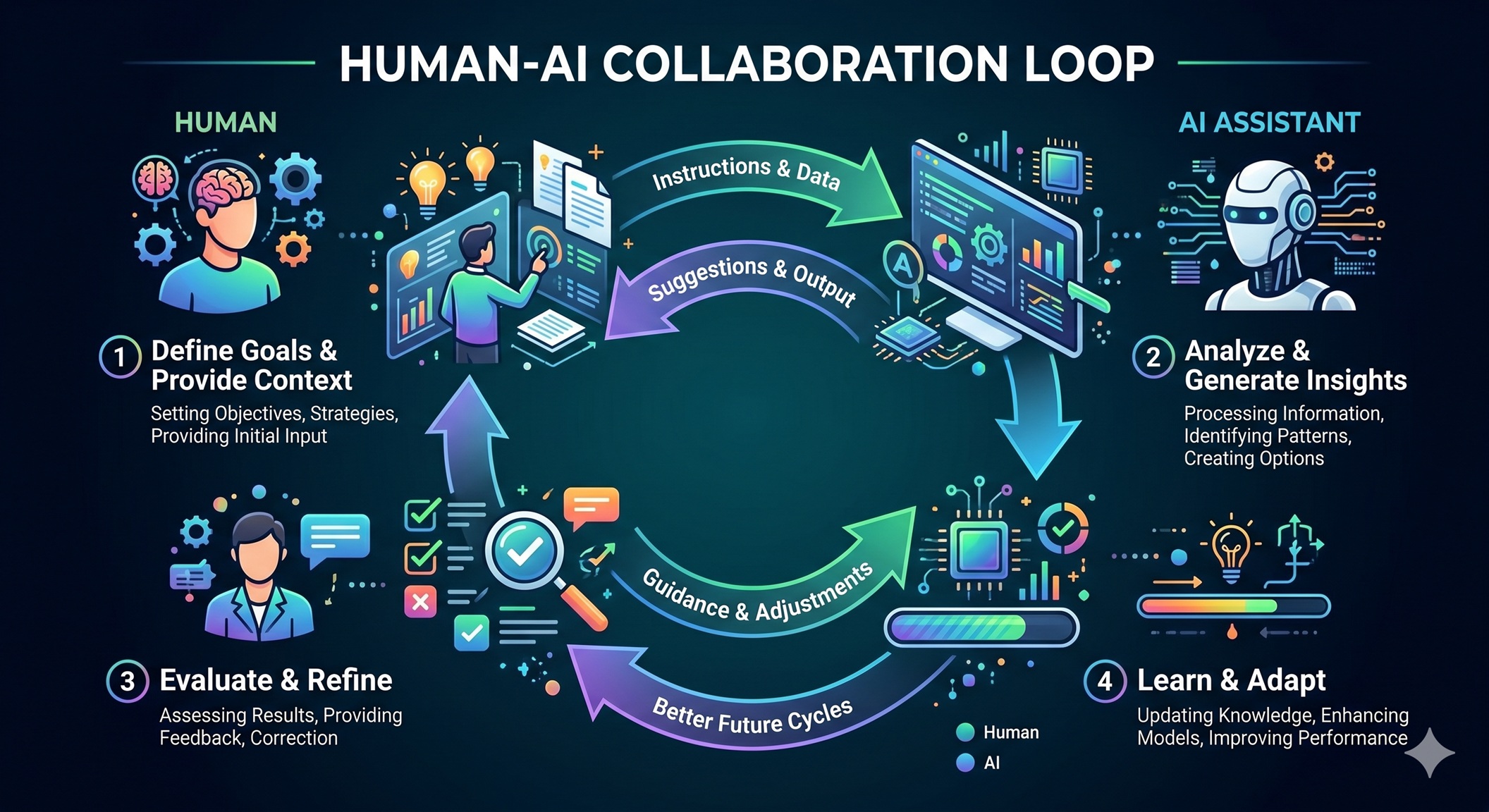

As indie developers juggling multiple projects, we were initially skeptical about AI coding assistants. The promises of 10x productivity sounded too good to be true, and we worried about becoming overly dependent on black-box suggestions. Yet after months of careful integration, we’ve found a sweet spot where LLMs amplify our capabilities without compromising code quality or our understanding of the systems we build. This article shares our practical framework for incorporating AI into app development while maintaining architectural control and technical sovereignty.
The Promise and Peril of AI in Development
When GitHub Copilot first launched, we tried it for a week and promptly disabled it. The suggestions were often impressively fluent but subtly wrong—using deprecated APIs, missing edge cases, or violating project conventions. We realized that blindly accepting AI-generated code creates technical debt faster than it saves time. The real danger isn’t that AI makes mistakes; it’s that it makes mistakes with confidence, lulling developers into a false sense of security.
However, dismissing AI entirely means missing genuine opportunities. Modern LLMs excel at pattern recognition across vast codebases, can generate boilerplate in seconds, and help explore alternative approaches we might not have considered. The key insight is treating AI not as an autonomous coder but as a highly knowledgeable junior developer who needs clear guidance, constant supervision, and rigorous validation.
Our integration strategy evolved through three phases: experimentation with low-risk tasks, establishing validation protocols, and finally incorporating AI into core development workflows with appropriate safeguards. This phased approach allowed us to build trust gradually while identifying where AI genuinely adds value.
Our Integration Strategy: Phased Approach
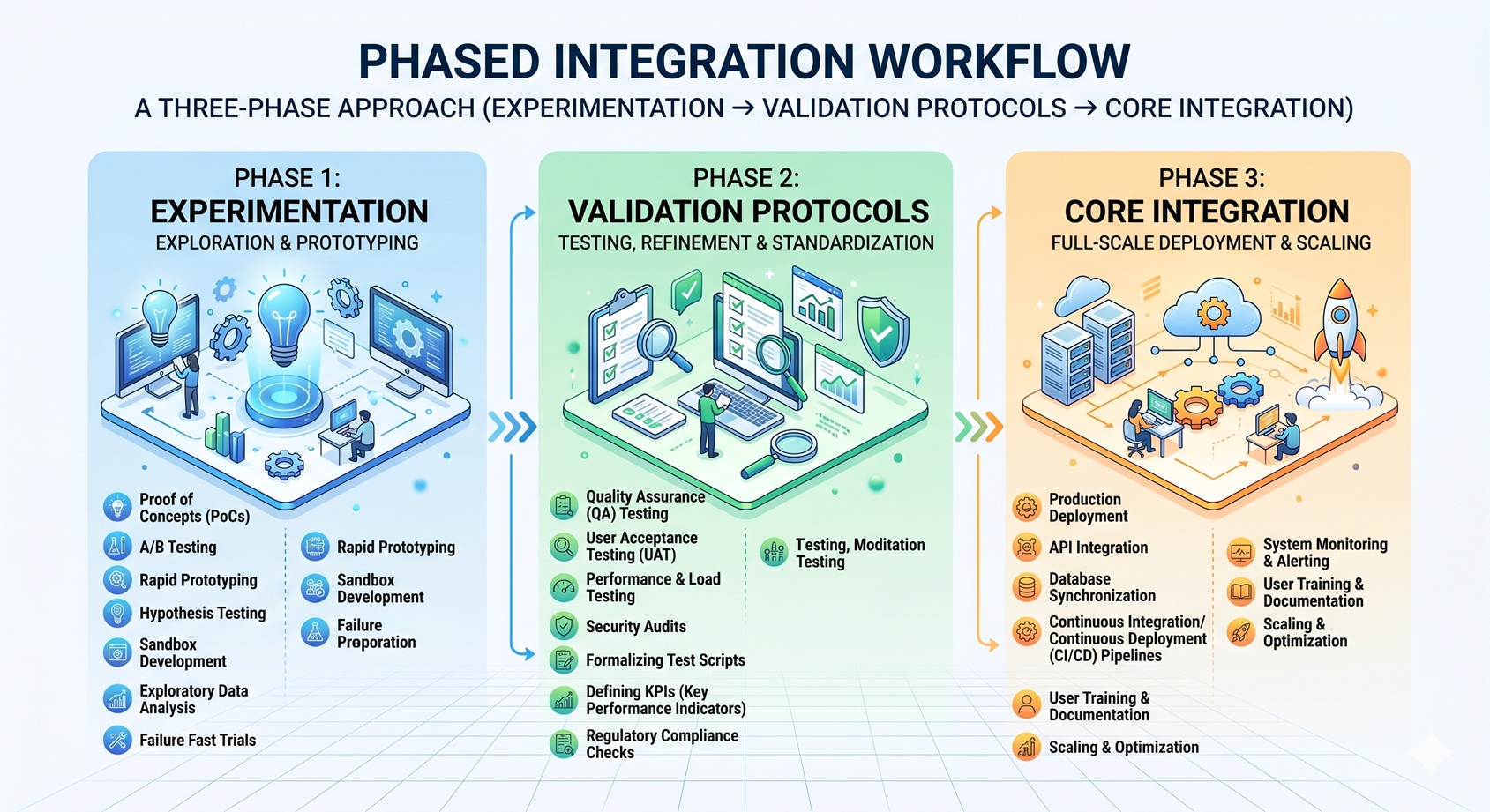
Phase 1: Experimentation with Contained Tasks
We began by limiting AI to well-defined, isolated problems where mistakes would be immediately obvious and harmless. Examples included:
- Generating unit tests for simple utility functions
- Creating boilerplate React components from Figma designs
- Writing SQL queries for basic CRUD operations
- Generating regex patterns for text validation
This allowed us to learn the AI’s strengths and failure modes without risking production code. We quickly discovered that AI excels at translating natural language descriptions into syntactically correct code but struggles with complex business logic and architectural decisions.
Phase 2: Building Validation Protocols
Before trusting AI with anything more significant, we established strict validation gates:
- Automated Testing: Every AI-generated snippet must pass existing unit tests and ideally add new ones
- Code Review: We treat AI suggestions like pull requests from a junior colleague—reviewing line by line
- Convention Checking: Using linters and formatters to ensure consistency with project standards
- Dependency Analysis: Verifying that AI doesn’t introduce outdated or insecure packages
These protocols transformed AI from a potential liability into a productive collaborator. The validation process itself became a learning opportunity, helping us identify gaps in our own testing coverage and coding standards.
Phase 3: Core Workflow Integration
With confidence established, we integrated AI into regular development cycles for specific, high-value use cases:
- Exploring alternative implementations for complex algorithms
- Generating API client code from OpenAPI specifications
- Creating data transformation pipelines
- Writing documentation and inline comments
- Refactoring repetitive code patterns
Crucially, we maintained ownership of architectural decisions, API design, and complex business logic—areas where human judgment remains irreplaceable.
Specific Use Cases: Where LLMs Shine
1. Boilerplate and Scaffolding
AI excels at generating repetitive code structures. When starting a new feature, we describe the requirements in natural language and ask the AI to create:
- REST API controllers with standard CRUD endpoints
- React components with props, state, and basic event handlers
- Database migration scripts for adding new tables/columns
- Validation schemas for form inputs
The AI handles the syntactic boilerplate while we focus on the unique business logic. This saves hours of tedious typing and reduces the chance of simple mistakes in repetitive patterns.
2. Learning Unfamiliar Technologies
When working with a new framework or library, we use AI as an interactive tutor:
- Asking for examples of common patterns (“Show me how to implement form validation in React Hook Form”)
- Requesting explanations of confusing error messages
- Getting suggestions for idiomatic approaches to problems
- Having AI translate concepts from familiar to unfamiliar tech stacks
This dramatically reduces the learning curve while ensuring we still understand the underlying principles rather than just copying code.
3. Breaking Through Mental Blocks
Everyone experiences developer’s block—staring at a blank screen unsure how to approach a problem. In these moments, we prompt AI with:
- “What are three different ways to solve [problem]?”
- “How would you approach [task] if you prioritized readability over performance?”
- “Show me a minimal example of [concept] in [technology].”
The goal isn’t to copy the AI’s answer but to use it as a springboard for our own thinking. Often, seeing one approach triggers a better solution we wouldn’t have considered otherwise.
Guardrails and Validation: Maintaining Control
The difference between helpful AI assistance and dangerous over-reliance lies in the safeguards you put in place. Our non-negotiable control mechanisms include:
1. The “Explain It Back” Rule
Before accepting any significant AI-generated code, we challenge ourselves to explain:
- How each part works
- Why the AI chose that approach
- What edge cases it handles (and misses)
- How it integrates with existing code
If we can’t explain it clearly, we don’t merge it—no matter how convincing it looks. This ensures we maintain true understanding and ownership.
2. Incremental Adoption with Rollback Plans
We never let AI generate more than 20-30% of a feature at once. Each AI-assisted increment:
- Gets its own commit with clear messaging about what was AI-generated
- Is tested in isolation before integration
- Can be cleanly reverted if issues arise
- Triggers additional scrutiny during code review
This limits the blast radius of any mistakes and makes debugging significantly easier.
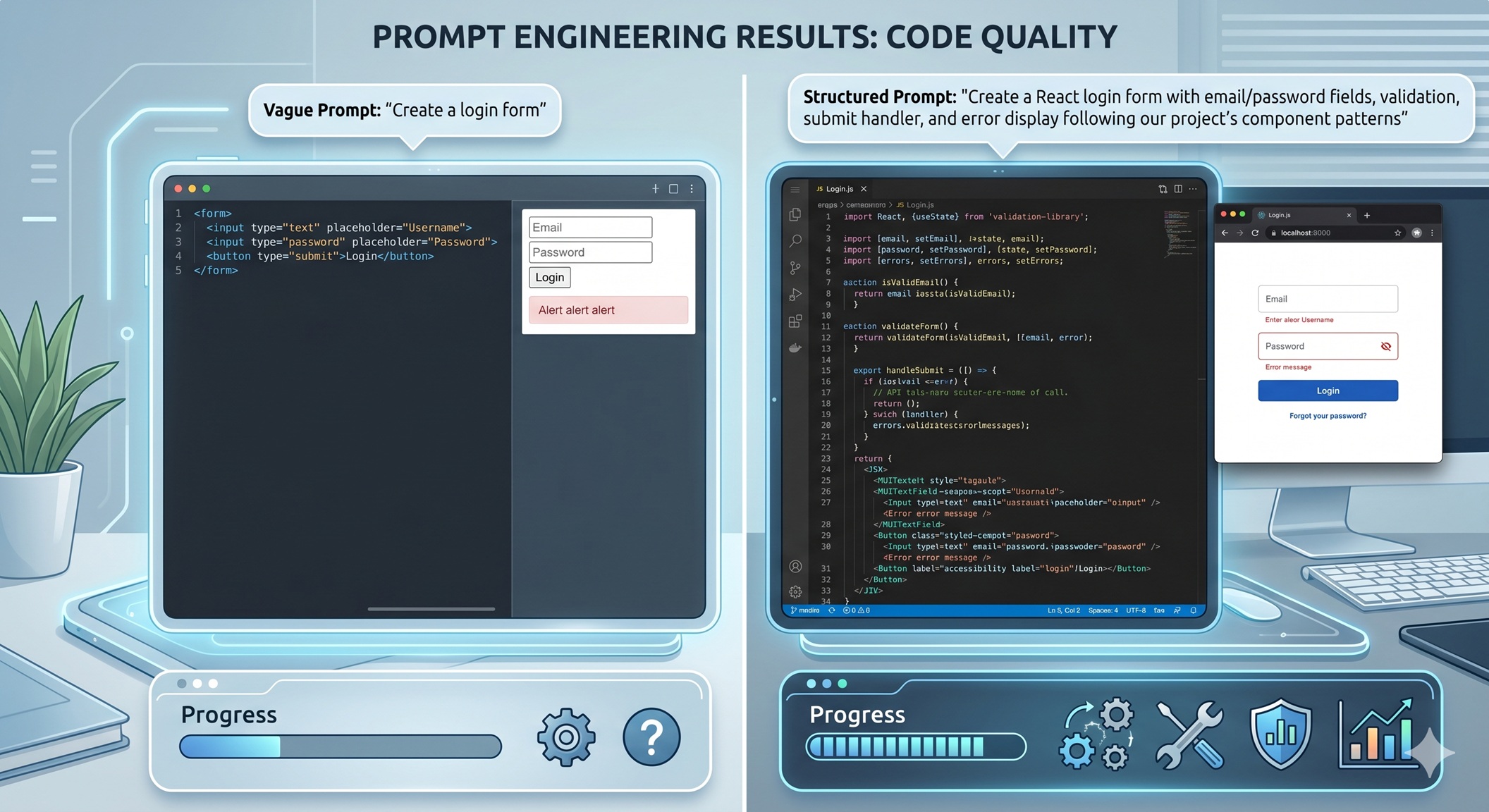
3. Specialized Prompt Engineering
Generic prompts yield generic (often flawed) results. We’ve developed prompt templates for different tasks:
- Code Generation: “Generate [technology] code to [specific task]. Follow [project] conventions: [list 3-5 key patterns]. Include error handling for [specific cases]. Add JSDoc comments.”
- Refactoring: “Refactor this [technology] function to [goal] while maintaining exact behavioral equivalence. Preserve [specific edge case handling].”
- Explanation: “Explain how this [technology] concept works, focusing on [specific aspect]. Use analogies where helpful but note limitations.”
These structured prompts dramatically improve relevance and reduce hallucinations.
Lessons Learned and Best Practices
After integrating AI into dozens of projects, here are the principles that have proven most valuable:
1. Treat AI as a Tool, Not a Crutch
The most successful developers we observe use AI to handle the mechanical aspects of coding while focusing their energy on the creative and judgment-intensive parts: understanding user needs, designing elegant architectures, and making ethical trade-offs. AI handles the “how”; humans own the “what” and “why.”
2. Invest in Your Validation Infrastructure
The time spent building robust test suites, clear coding standards, and automated checks pays dividends when working with AI. These systems act as safety nets that catch AI mistakes before they reach production. Consider your validation infrastructure as essential as your version control system.
3. Develop AI Literacy
Understanding how LLMs work—their training data limitations, tendency toward statistical plausibility over correctness, and sensitivity to prompt phrasing—makes you a better collaborator. This knowledge helps you craft better prompts and interpret AI output more critically.
4. Maintain a Skeptical Mindset
Healthy skepticism is your best protection against AI overconfidence. Question every suggestion, especially those that feel “too easy” or solve problems suspiciously elegantly. Remember that AI optimizes for plausible completion, not necessarily correct or optimal solutions.
5. Share Your Experiences
Discussing AI integration strategies with peers reveals blind spots and promotes community best practices. Whether through blog posts, team retrospectives, or conference talks, sharing both successes and failures helps everyone navigate this evolving landscape more effectively.
Conclusion
AI-assisted development isn’t about replacing human developers—it’s about elevating what we can accomplish. By treating LLMs as knowledgeable but fallible collaborators, establishing rigorous validation protocols, and maintaining clear ownership of architectural decisions, we’ve found a workflow that genuinely amplifies our capabilities.
The key insight is that control isn’t lost through AI integration—it’s transformed. Instead of spending hours on syntactic boilerplate and repetitive patterns, we invest that energy in higher-level thinking: understanding user problems more deeply, exploring innovative solutions, and ensuring our apps truly serve human needs. The AI handles the “how” of implementation; we remain firmly in charge of the “what” and “why.”
As these tools continue to evolve, the developers who thrive will be those who master the art of collaboration—knowing when to lean on AI’s strengths and when to rely on their own judgment, experience, and creativity. The future belongs not to those who reject AI or those who surrender to it, but to those who learn to dance with it skillfully.



Leave a Reply